



















TL;DR
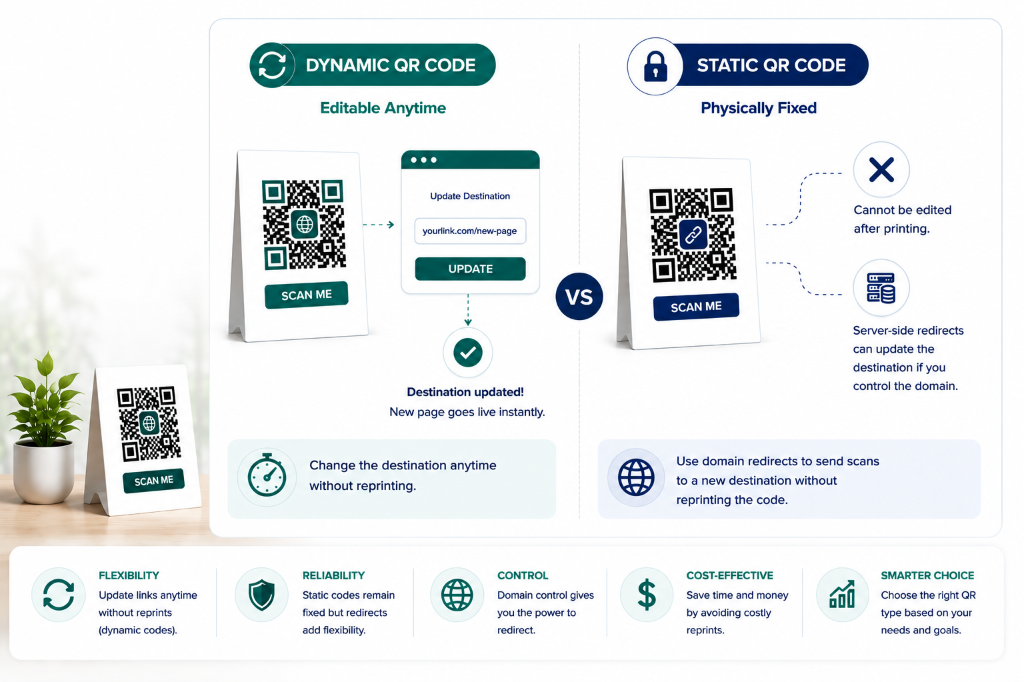
- ·Dynamic codes: the destination is editable in your dashboard anytime, with zero reprinting.
- ·Static codes: the destination is baked directly into the QR code and can't be edited after printing.
- ·A static code can still be rescued with an HTTP 301 redirect, but only if you own the domain it points to.
- ·If the domain is wrong, third-party, or the code holds offline data (Wi-Fi, vCard), no server-side fix exists; reprinting is the only option.
- ·A 301 redirect doesn't hurt SEO and resolves instantly, so it's a safe permanent fix, not a temporary patch.
You have just printed 5,000 product boxes, laminated 100 outdoor signs, or distributed event brochures — only to discover the target landing page has changed or contains a broken link. The urgent question is whether the destination can be updated without discarding physical materials.
The answer depends entirely on the technical architecture used when the code was originally generated. Dynamic codes offer full post-print flexibility. Static codes are physically fixed, though server-side redirects can provide a recovery path when you control the destination domain.
01 Can You Change a QR Code Link After Printing?
Whether you can change a printed code's destination depends on which type you generated:
Quick Answer
Can You Edit It After Printing?
Dynamic: Yes — without reprinting.
Static: No direct edit is possible, but an HTTP 301 server redirect can rescue the destination if you own the encoded domain.
By Architecture:
- Dynamic (active): Update destination in dashboard — zero reprinting
- Static (owned domain): Rescue via HTTP 301 server redirect
- Static (wrong domain / offline): Reprinting is the only option
02 What “Editing a QR Code” Actually Means
To understand post-print flexibility, it is essential to distinguish between changing the physical barcode pattern and changing the digital destination behind the barcode. These are two completely separate concepts.
Changing the Printed Modules
Under ISO/IEC 18004, the visual pattern is a direct geometric translation of binary data. Once ink, toner, or laser etching is applied to a substrate, that pattern cannot be modified remotely. No technology can change printed ink over the air.
Always Impossible After Printing
Changing the Destination Behind It
Dynamic codes achieve “editing” through server indirection. The QR code encodes a permanent short URL (e.g., qr.domain.com/abc123). Updating the destination in a dashboard changes only the database pointer — the physical symbol is untouched.
Possible with Dynamic Architecture
03 Can You Edit a Static QR code After Printing?
With a static code, the encoded data payload — such as https://example.com/promo-page — is mathematically baked into the module grid. A scanning device reads the URL directly from the printed ink and sends an HTTP request to that server.
Because the destination is encoded directly into a static code, the destination cannot be changed after printing. However, two recovery paths exist:
If the printed code encodes a valid URL on a domain you control, you can configure an HTTP 301 redirect on your web server to forward visitors to the new page. The printed code stays unchanged, but users arrive at the correct destination.
Physical Reprint (When Domain Rescue Is Impossible)
If the code encodes a third-party URL (like a social media profile or an app download link) you do not own, contains a typo in the domain name itself, or encodes offline data such as a vCard or Wi-Fi credential, no server redirect is possible. Reprinting the physical asset is the only option.
04 Can You Edit a Dynamic QR code After Printing?
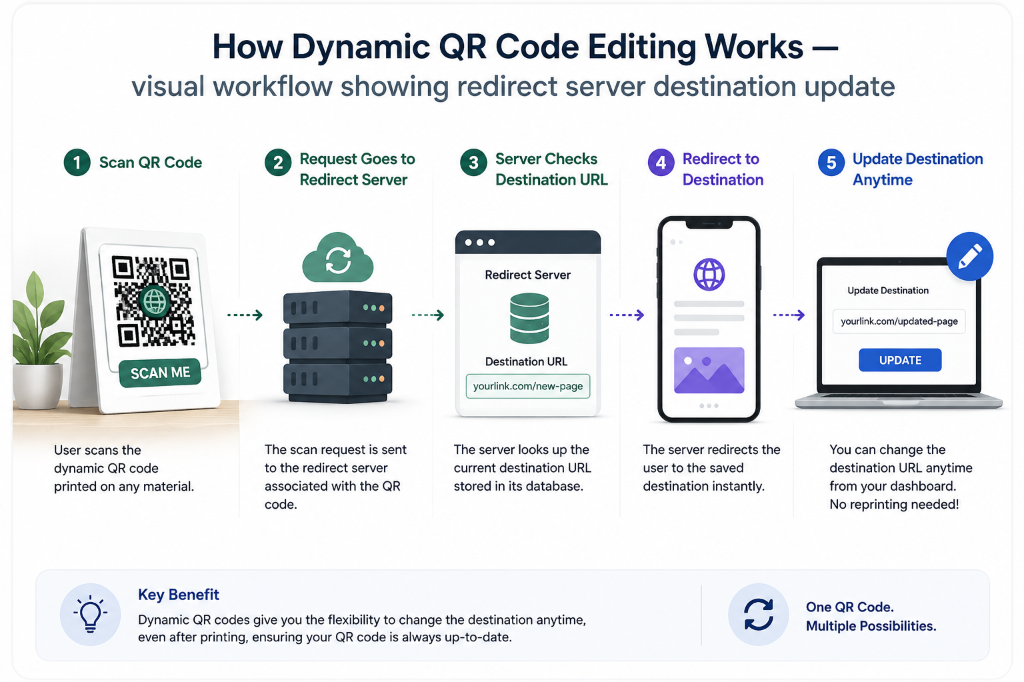
Dynamic codes are specifically engineered for workflows where destination flexibility is required after physical distribution. When a user scans a dynamic code, the process executes in two steps under IETF RFC 9110:
The scanner reads the printed short URL and connects to the provider's redirect server.
The server looks up the current destination in its database and returns an HTTP redirect response, forwarding the browser to the target page.
Because the printed matrix only encodes the intermediary short URL, you can log into your dashboard at any time, paste a new destination, and save. The change takes effect globally for all existing printed copies — no reprinting required.
The key advantage of a permanent dynamic code is that destination changes do not require touching the physical printed asset — the code on the box, sign, or label remains identical while the QR code it resolves to can evolve indefinitely.
05 Step-by-Step Workflow: How Dynamic Editing Works
Here is the standard operational workflow for managing and updating printed dynamic codes throughout their lifecycle:
Create a Dynamic Symbol
Generate the code using a permanent dynamic hosting platform to ensure long-term destination editing rights without monthly subscription risks, subject to platform terms. A pay-once service reduces the risk of redirects going dark due to a lapsed billing cycle.
Export Print-Ready Vector Files
Download in vector format — SVG, PDF, or EPS — so the barcode scales losslessly to any print size without pixelation or blurry module edges.
Print and Distribute
Apply the code to packaging, signage, retail labels, or printed marketing materials (like an image gallery, a list of links, or multi-language content). Ensure at least 4 module widths of quiet zone margin and high ink contrast before authorizing a full print run.
Update the Destination Anytime
When you need to change the target page — rotating a seasonal menu, updating a PDF brochure, or switching a campaign landing page — log into your management dashboard and paste the new URL.
Save and Verify
Save the new destination and test by scanning your existing physical printed materials across both iOS and Android camera apps. They will resolve to the new destination once processed.
Need a permanent dynamic code with long-term hosting? One payment — no subscription traps.
See pricing →06 Decision Tree: What to Do If Your Code Is Already Printed
If you have already printed a batch and need to change the destination, use this framework to determine your next action:
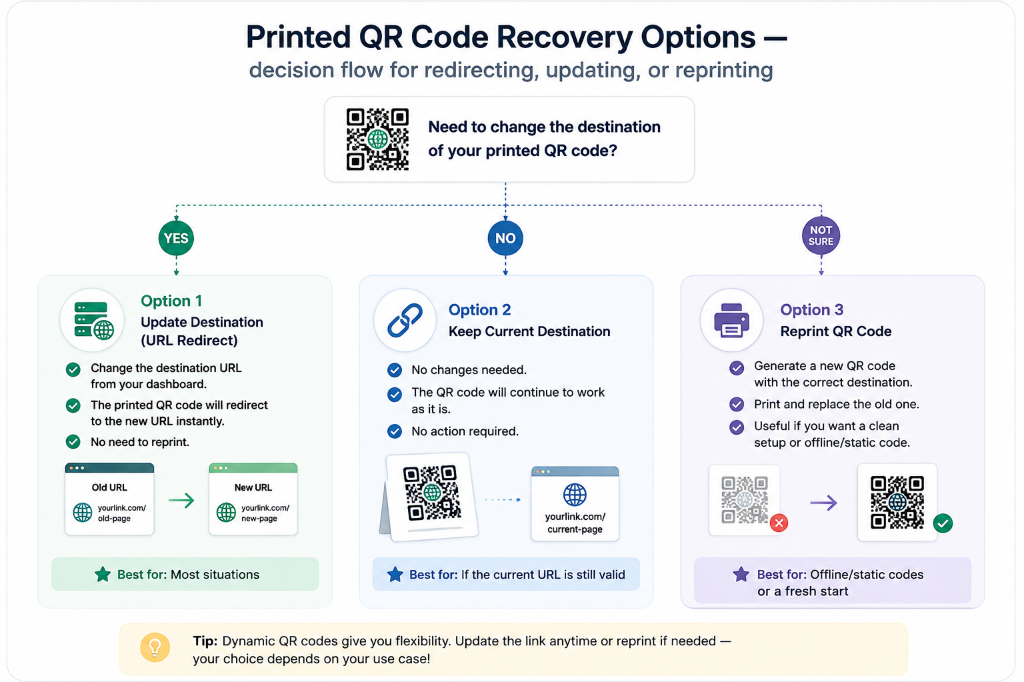
Post-Print QR code Recovery Decision Matrix
| Scenario / Code Type | Can You Control Destination? | Required Action | Cost / Impact |
|---|---|---|---|
| Dynamic QR (Active Account) | Yes, Fully Editable | Log into dashboard, update URL, and save | Zero cost; global update |
| Static QR (Owned Domain) | Yes, Server-Side Only | Add HTTP 301 redirect in Apache/Nginx/.htaccess | Zero print cost; small server config required |
| Static QR (Typo in Domain) | No, Impossible | Reprint materials with a corrected dynamic code | Requires physical reprinting |
| Static QR (Offline vCard / Wi-Fi) | No, Impossible | Reprint materials with updated credentials | Requires physical reprinting |
07 How to Configure a Server-Side Redirect for Static Codes
If you printed a static code pointing to a URL on a domain you control, you can implement an HTTP 301 Permanent Redirect on your web server. This ensures any scanner is forwarded to your new page without encountering a 404 error.
Apache Web Server (.htaccess)
Add the following rule to your .htaccess file in the site root:
Redirect 301 /old-printed-path https://example.com/new-destination-pageNginx Web Server (nginx.conf)
Add a rewrite directive inside your server block:
location = /old-printed-path {
  return 301 https://example.com/new-destination-page;
}
Server-side redirects are a one-time rescue tool — not a long-term strategy. For any future commercial print run, use a dynamic code from the start to avoid the need for server intervention entirely.
08 How to Prevent Reprinting Mistakes Before You Print
Reprinting commercial packaging or outdoor signage is expensive and time-consuming. Eliminating the risk of uneditable broken codes on future print runs requires these pre-flight practices:
Prefer Dynamic QR code When the Destination May Change
Avoid using a static code on high-volume product packaging, books, or permanent outdoor signage where a broken link would require a product recall or costly reprint run.
Avoid Subscription Traps
Many dynamic generators require ongoing monthly subscriptions and disable redirects if the subscription ends. A pay-once dynamic service reduces that risk — the redirect infrastructure remains active without recurring monthly subscription fees.
Test Across Multiple Devices
Before authorizing a full print run, scan the physical proof using both iOS and Android default camera apps under varying lighting conditions and scan angles.
Verify Contrast and Quiet Zones
Ensure a minimum 4-module quiet zone margin and high contrast between dark modules and the background substrate. For full physical durability guidance, see how long QR code last.
09 Real-World Scenarios
To illustrate how printed codes function under pressure, examine these four common real-world use cases. Each example highlights the operational challenges of printed material distribution and the recommended architecture to mitigate risk.
Product Packaging Distribution
A business prints QR code on product packaging before distribution, directing scanners to a product information page.
The destination page may need to change after the packaging has already been printed. Static patterns cannot change, leaving printed boxes with dead or incorrect links unless server-level HTTP redirect control is available on that domain.
If the destination may change, use a dynamic routing layer so that the destination URL can be updated dynamically without altering the printed symbol pattern.
Restaurant Menus and Table Cards
A restaurant prints menus or table cards to route customers directly to a digital menu URL.
The menu URL changes over time as seasonal menus rotate or menu hosting providers change. A static setup retains the original URL, requiring complete menu design changes and reprints when destination paths shift.
Link menus using dynamic routing. The target URL can point to the current active menu version in the backend while the printed material stays exactly the same.
Event and Campaign Materials
An event organizer distributes printed flyers, posters, and brochures before a marketing campaign launch.
The campaign landing page needs to change due to event rescheduling, schedule shifts, or ticketing link updates. In static setups, flyers must be discarded or manually stickered.
Use a dynamic link system so the team can edit the destination URL after printing, preserving already-distributed marketing materials and avoiding wastage.
Equipment and Asset Labels
A facility applies permanent labels to machinery, linking inspectors or maintenance staff to documentation.
Safety documentation is updated or migrated to a new domain over the years. Replacing highly durable physical labels applied directly to machinery is tedious and expensive.
Use dynamic routing so the physical label stays in place for years, and updates to the digital destination are managed in the cloud redirect dashboard.
Redirect Routing Behavior
Before Destination Changes
- Static: Printed Code →
old-destination.com/page - Dynamic: Printed Code → Redirect Gateway →
old-destination.com/page
After Destination Changes
- Static: Printed Code →
old-destination.com/page(Requires control of original URL/server redirect to rescue, otherwise reprinting may be required) - Dynamic: Printed Code → Redirect Gateway →
new-destination.com/page(Updated easily via dashboard without changing printed QR pattern)
Testing campaign pages without touching the print
An editable code lets a printed piece work as a test bench. Point the code at one landing page this week and a different one next week, then compare conversions in your web analytics. The flyer, label or package does not change, so the page is the only variable.
The dashboard records each scan with the device type, the operating system and the approximate city. Use it to see how many people scan on iPhone and on Android and which cities or placements produce scans, then tune the landing page for the phones your audience actually uses.
Keep a dated note of every destination change. A conversion shift a month later is hard to tie to one change without it.