TL;DR
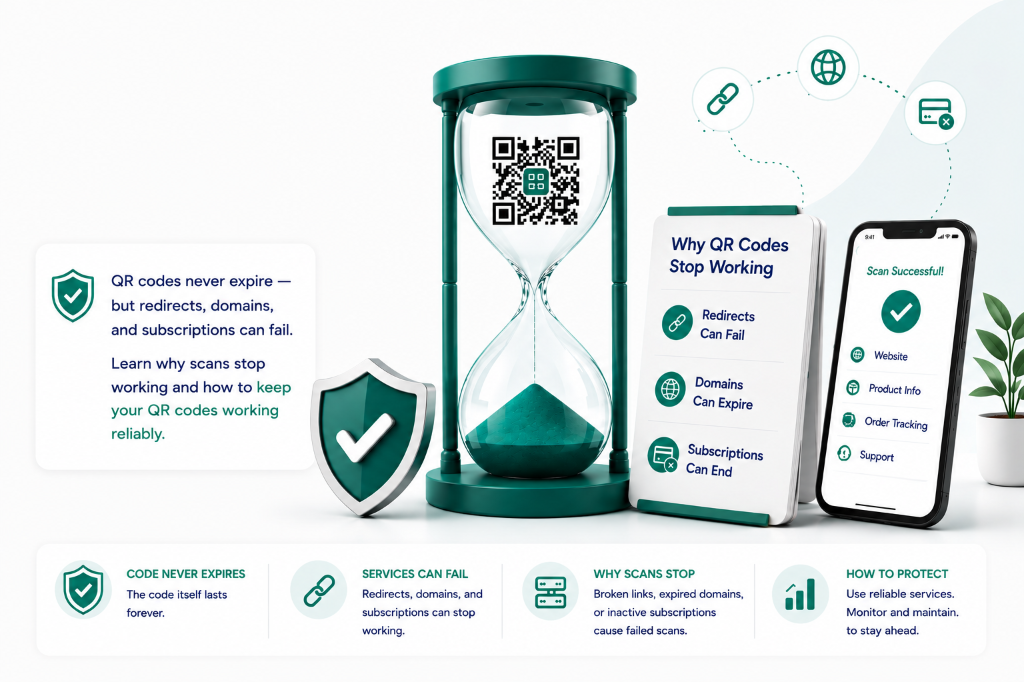
- ·The QR pattern itself never expires; it has no timer or shutoff built into the ISO/IEC 18004 spec.
- ·A static code fails only if the destination page it encodes directly moves or goes offline.
- ·A dynamic code depends on an intermediary redirect service, so a lapsed subscription breaks the scan even though the printed symbol is untouched.
- ·Common failure causes: a canceled subscription, a changed destination URL, an expired domain, a broken SSL certificate, or physical damage.
- ·For long-term reliability: use a domain you control, export as vector, use high error correction, and avoid a subscription model for anything meant to last decades.
Looking for physical print durability?
This guide covers digital redirect architecture, ISO standards, and expiration mechanics. For physical durability (how sunlight, weather, paper, vinyl and etched metal hold up), see how long a printed QR code lasts below.
A standard QR code is a visual representation of data. As a mathematical grid, the code itself does not have an expiration date. A static code will function indefinitely as long as the printed graphic remains scannable and the destination URL is active. Dynamic codes are different: the printed visual pattern does not expire, but the routing service behind it requires active hosting, a valid domain, or a paid subscription.
A scan depends on a chain of independent layers. Understanding how long a code lasts — and why it might fail — requires separating these five layers:
- The Printed Matrix: The arrangement of black and white squares. Governed by the open ISO/IEC 18004 standard, it has no built-in clock or expiration mechanism.
- The Encoded URL or Data: The exact text or link baked into the barcode grid at the time of generation, which is fixed permanently in print.
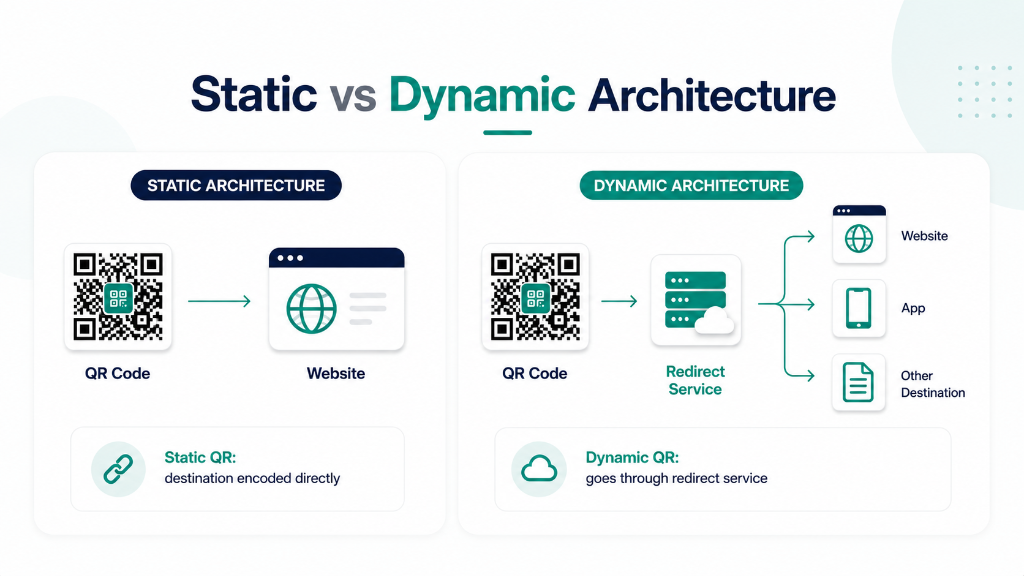
- The Redirect Service (Dynamic only): The intermediate server that intercepts the scan, logs analytics, and routes the user to the destination.
- The Destination Page: The final website or asset. If this page moves, changes URL, or goes offline, the scan chain breaks.
- The Physical Material: The surface (paper, plastic, metal) where the code is printed or etched.
Quick Answer
Do They Expire?
No. The visual patterns do not contain an expiration timer.
What can fail is the hosting, redirect service, or target link behind the symbol.
What can stop working:
- The destination website
- The domain registration
- The redirect service
- The hosting subscription
- The SSL certificate
- The physical print substrate
01 How Long Does a QR Code Last?
How long a code remains functional depends entirely on whether it is static or dynamic, and how well the physical print and digital infrastructure are maintained.
Static Codes
Static codes hardcode the destination data directly into the matrix. Because they connect the scanner directly to your target link without intermediate redirect servers, they are free forever and cannot be disabled by a generator. However, they are completely immutable: if the URL changes, you must reprint the code.
Dynamic Redirects
Dynamic codes encode a short redirect link rather than your final destination. This allows you to update the target URL in your dashboard at any time without reprinting. However, they require active routing servers: if your redirect subscription lapses or the provider goes out of business, the scans will break.
| Feature | Static Barcode | Dynamic Redirect |
|---|---|---|
| Pattern expires | No | No |
| Destination editable post-print | No | Yes |
| Risk of subscription expiration | Zero | High (unless permanent/pay-once) |
| Provider dependency | Low | Higher |
| Best for | Wi-Fi, stable links, personal use | Packaging, marketing, books, signs |
How Long a Printed QR Code Lasts
Physical wear is separate from digital expiration. Paper prints can fade in sunlight or dissolve in moisture within months, while laser-etched stainless steel can remain readable for decades. Outdoor decals require UV-resistant lamination to prevent contrast degradation. Scanning relies on clear optical contrast: once the contrast drops, the camera can no longer decode the matrix.
Even when every server is running, these five physical factors cause most printed codes to become unreadable:
Outdoor sunlight breaks down organic dye-based inks over time, reducing the luminance contrast between the dark modules and the background substrate.
High-contact surfaces (such as packaging, equipment tags, or table menus) suffer mechanical scratches that can obscure alignment patterns.
Standard paper and thermal receipt labels degrade rapidly when exposed to humidity, grease, or heat.
The ISO standard requires a mandatory clear border (quiet zone) of at least 4 module widths around the symbol. Graphics bleeding into this border cause scanner failure.
Raster images printed below 300 DPI can produce blurry module edges, causing scan failures on budget smartphone cameras.
02 Does the QR Graphic Itself Expire?
No. A QR code is a mathematical encoding of characters. The graphic has no countdown timer or license key. Like a printed mailing address, the text doesn't expire, but the destination it points to can move or go out of business.
"A barcode does not expire like milk; it breaks like a phone number. If someone disconnects the line at the telephone exchange, the number you dialed is not 'expired' — the destination simply stopped answering."
When a scan fails, the error is almost never in the black-and-white grid. It has failed at one of the digital or physical layers: the redirect service, domain registration, target website, or print contrast.
03 Why Do Scans Stop Working?
Scans fail due to digital breaks or physical damage. Understanding these failure modes helps troubleshoot and prevent issues before printing.
1. The Destination Page Is Offline
The target web page is deleted, renamed, or its hosting has lapsed, returning a 404 error. The barcode itself is intact, but the landing page is gone.
2. The Domain Ownership Lapsed
Domains must be renewed annually. If domain registration expires, the link stops resolving and the scan fails.
3. Redirect Server Outage
For dynamic codes, the intermediate redirect gateway must be active. If the platform experiences an outage or decommissions links, the scans break.
4. Subscription Ended or Trial Expired
Many generators advertise \"free codes\" that are temporary trials. When the trial ends or the billing subscription lapses, the provider disables the redirect.
5. SSL/TLS Certificate Problems
If the target website's security certificate expires, mobile browsers and scanners will block the redirect with security warnings.
6. Physical Print Damage
UV fading, scratches, warp, or dirt can obscure the grid modules. If damage exceeds the error correction level, the scan fails.
7. Printed Too Small
QR patterns require minimum physical dimensions relative to scanning distance. Printing below 2 cm (0.8 in) severely impacts scan rates.
8. Scanner Network Restrictions
Scanning devices on corporate networks, behind firewalls, or using restricted VPN traffic may block target redirect domains.
Failure Layer Diagnostic Matrix
Identify the responsible team and first diagnostic step when a scan fails in production.
| System Layer | Responsible Owner | First Check | Remediation |
|---|---|---|---|
| Print Substrate | Packaging / Print QA | Re-scan master proof under direct light; measure quiet zone | Reprint with higher contrast or Level H error correction |
| Redirect Host | QR Provider / IT | Check HTTP status, DNS resolution, and SSL certificate validity | Migrate to permanent redirect infrastructure with no subscription renewal |
| Destination Server | Web / Marketing Team | Test final URL directly in browser; check 404, redirect loop, or geo-block | Update dynamic QR destination to active page or restore 301 route |
| Client Network / Device | End User Support | Test on cellular vs corporate Wi-Fi; check camera scanner app | Ensure domain is not falsely categorized by corporate firewalls |
04 What Does "Permanent" Actually Mean?
In the barcode industry, a permanent solution guarantees redirect hosting stays active without recurring monthly fees, combining static longevity with dynamic flexibility.
The visual grid is a mathematical layout standard that does not expire.
Permanent Redirect Hosting
The underlying routing gateway remains online without requiring a subscription.
User-Maintained Destination
You remain responsible for keeping the target website, DNS, and SSL active.
Subscription-Free Model
A single one-time payment replaces ongoing monthly SaaS invoices.
Editable Target Link
The target URL can be edited dynamically in your dashboard at any time.
Enterprise Vocabulary: What to Require in Vendor Contracts
"QR code that never expires" is marketing shorthand. When drafting commercial packaging agreements, retail display specs, or software licenses, your legal and procurement team should explicitly require:
- · Redirect Operator Continuity: Explicit definition of who operates the redirect gateway and a contractually guaranteed uptime SLA (minimum 99.9% uptime).
- · Zero Renewal Dependency: Confirmation that the dynamic redirect license is perpetual with no recurring subscription fees that could shut off printed assets upon non-payment.
- · Uncapped Concurrency: Contractual assurance that scan volume is unlimited and will not be throttled or capped during viral marketing spikes or live events.
- · Data Export & Fallback Routing: Clear rights to export scan histories and redirect destinations to fallback DNS if needed.
Operational Monitoring: Treating QR Codes Like Production Infrastructure
For high-value commercial print runs, treat your QR codes like mission-critical API endpoints:
- Synthetic Uptime Pings: Schedule automated synthetic HTTP checks against your QR redirect URLs from multiple global regions to catch routing delays or SSL cert expirations before customers do.
- Staging Destination Verification: When re-pointing dynamic QR destinations, test the target URL in a private browser window to confirm no broken assets, missing SSL certs, or staging password walls.
- Print Lot Tracking: Keep an internal registry of print dates, substrate material, and associated QR short codes for each manufacturing lot to simplify recall or customer support debugging.
05 How to Make a Code That Lasts
Follow this checklist to build and deploy scannable patterns that stand the test of time.
Choose the Correct Architecture
Use static for permanent, unchanging data; use dynamic for anything that might need updates after printing.
Use a Domain You Control
Avoid pointing codes to domains managed by third parties or temporary platforms.
Keep the Target Link Stable
Ensure landing pages and asset links are not renamed or restructured after release.
Limit Redirect Chains
Every step in a redirect chain increases latency and potential connection drops.
Print High-Resolution Vector Assets
Export designs in SVG or PDF vector format to ensure clean print lines at any scale.
Maintain Contrast and Quiet Zones
Always print dark modules on light backgrounds with a clear margin around the symbol.
Test the Physical Print
Scan test sheets under realistic lighting using multiple devices before final production.
Set Up Uptime Monitoring
Configure simple checks to notify you immediately if target landing pages return errors.
Document Asset Placements
Keep clear records showing which code versions are printed on specific packaging batches.
Verify Cancellation Policies
Ensure dynamic routing continues even if dashboard management accounts are closed.
06 Will It Work If You Cancel?
Whether scans resolve after cancellation depends on the underlying architecture of your generator account.
Static Codes
Static codes bypass intermediate servers completely. Canceling your account will never affect them; they continue resolving as long as your destination website remains active.
SaaS Dynamic Codes
Most dynamic generators delete or lock redirect links immediately upon subscription expiration or cancellation, rendering your printed assets unusable.
Permanent Redirects
A one-time payment structure keeps dynamic routing online indefinitely, eliminating subscription risks while retaining target editing capabilities.
Before purchasing any routing service for commercial print, ask:
- •Is there a recurring subscription? What is the billing cycle?
- •What happens to redirects after cancellation — immediately, or after a grace period?
- •Does the scan stop if my account is closed?
- •Can I still edit the destination after cancellation?
- •Who controls the redirect domain, and what happens if it changes?
- •Are scans unlimited at this tier, or capped per month?
- •Is there a written permanent or permanence policy?
07 How to Check If a Scan Works
Run through this quick validation sequence to troubleshoot scan failures or check live assets:
For Businesses: Treat QR Codes Like Infrastructure
While a broken scan on a personal business card is a minor issue, a dead link on 100,000 units of product packaging is an operational failure. Businesses should treat physical barcode links like other digital systems by setting up automated uptime checks, tracking printed lot runs, and documenting ownership of critical redirect domains.
Customer-Facing Copy Templates
These simple templates reduce customer confusion and support load when links are used in customer-facing materials.
"Having trouble scanning? Check that your camera has permission to scan codes, try a different phone, or contact our support team."
"This link opens our latest product information, menu, or campaign page."
"This scan may record basic scan information (approximate location, device type, and timestamp) to help us understand usage. No personal data is collected without your consent."
Barcode Maintenance Checklist
For any barcode used in a B2B context, run through this checklist at least once a year — or whenever a print run is refreshed.
- Verify the target URL resolves correctly.
- Verify HTTPS is active and the SSL certificate is valid.
- Check domain ownership and note the next renewal date.
- Test the barcode scan from the actual printed material, not just a digital screenshot.
- Test with multiple phones in realistic lighting conditions.
- Check redirect hosting subscription or account status.
- Review redirect settings — is the destination still pointing to the correct URL?
- Inspect printed materials for physical damage, fading, or deformation.
- Update customer support documentation with current destinations.
- Record which layout versions appear in which print batches.
09 Real-World Examples
Restaurant Menus
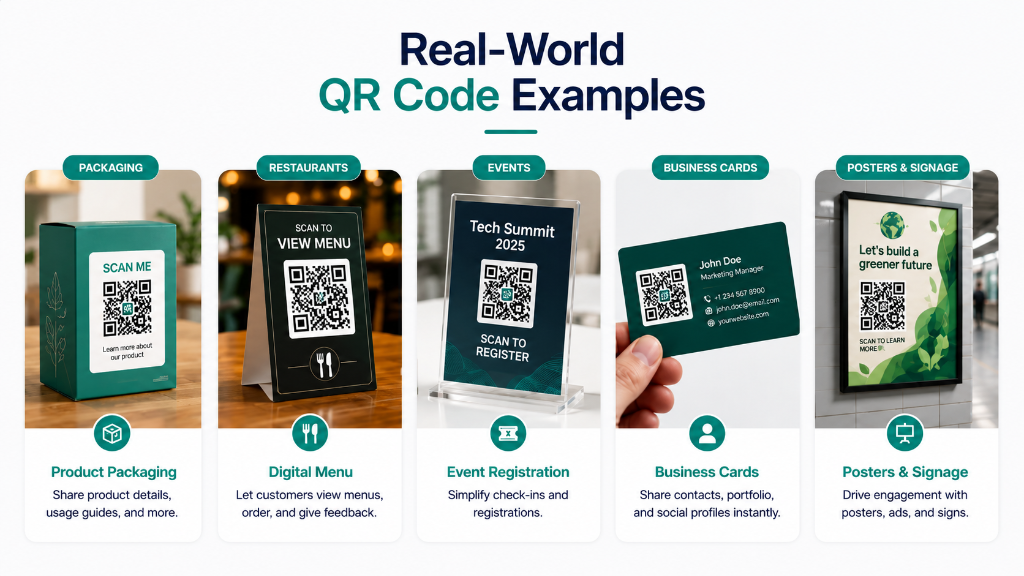
Laminated table codes let customers scan to view menus. A dynamic model lets you update menu URLs seasonally without reprinting, but subscription lapses will disable scans across every table.
Business Cards
A static contact link is highly reliable but immutable. Keep domain registration active so the cards you hand out continue to resolve.
Product Packaging
Packaging lives on retail shelves and in homes for years. High-resolution dynamic prints with permanent hosting commitments ensure long-term scannability.
Event Posters
Posters advertise registration links. Static codes suit simple, short-term links, while dynamic redirects let you reuse the poster for annual campaigns.
Real-Estate Signs
Outdoor yard signs are reused across listings. Dynamic redirects enable agents to change target property URLs instantly without ordering new physical signs.
Books & Publications
Printed pages stay in circulation for decades. Using editable links with permanent routing avoids dead destination URLs when online resources move.
Legacy Memorials
Codes on grave markers require maximum durability. Laser engraving on marine-grade stainless steel combined with permanent redirect hosting ensures legacy web pages remain accessible for future generations.
FAQ & Clarifications · 10
Frequently Asked Questions
Answers to common questions about QR code expiration, permanence, and subscription risks.